まず、OBS連携を使うために、OBS Websocketをいれてください。少なくとも、v4.8 以上をいれてください。
インストールが完了すると、OBSの設定がふえます。
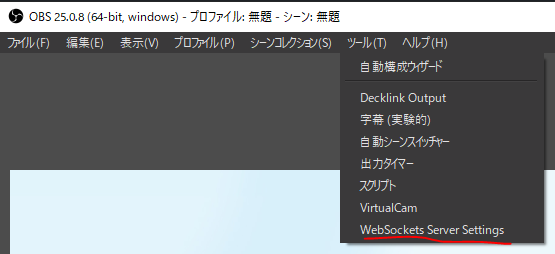
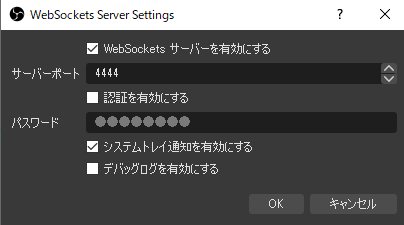
設定を開くと、通信ポートとパスワードを設定する画面がでます。
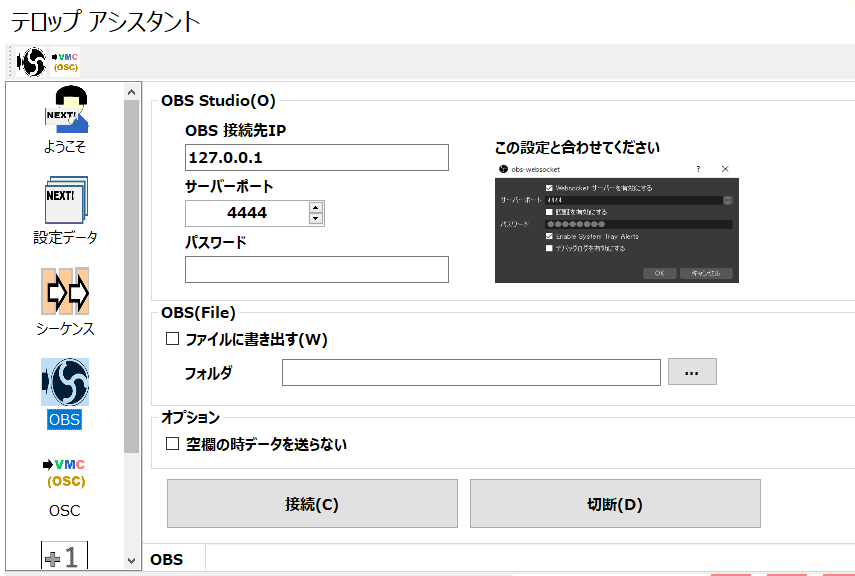
パスワードや通信ポートは、この画面に入力し、OBS側の設定と一致させましょう。
設定が終わったら、接続ボタンをおします。

OBSの枠が青色になれば、無事接続が完了しています。
まず、OBS連携を使うために、OBS Websocketをいれてください。少なくとも、v4.8 以上をいれてください。
インストールが完了すると、OBSの設定がふえます。
設定を開くと、通信ポートとパスワードを設定する画面がでます。
パスワードや通信ポートは、この画面に入力し、OBS側の設定と一致させましょう。
設定が終わったら、接続ボタンをおします。
OBSの枠が青色になれば、無事接続が完了しています。