フォト読み込み

できること

・キーワードにあわせて画像を表示します。

設定

まずは、プラグインを有効化します。

その次に、設定をします。

引き当てるデータ設定
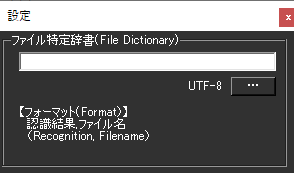
まず、辞書ファイルをつくって読み込ませます。これは「どのキーワードがきたら、どの写真を検索するか」を定義するものです。

テキストファイルで、下記のような形で作りましょう。たとえば、「私のディスコード」というキーワードがでたら、discord.jpgを表示する・・・という場合は、下記の設定になります。

私のディスコード,discord.jpg

ファイルを保存するときは、UTF-8形式で保存します。
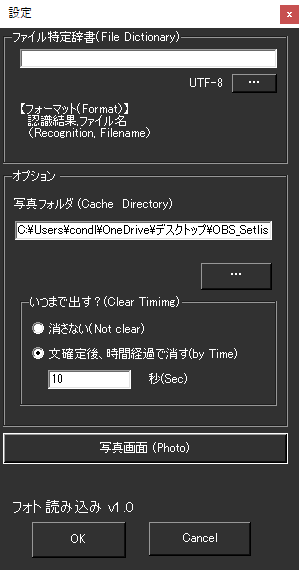
  • 条件に当てはまる場合は画像が表示されます。
  • 画像を消す条件はこちらで設定を入れておきます。

This website stores cookies on your computer. These cookies are used to provide a more personalized experience and to track your whereabouts around our website in compliance with the European General Data Protection Regulation. If you decide to to opt-out of any future tracking, a cookie will be setup in your browser to remember this choice for one year.

Accept or Deny